Enclosure print files · releases
Download broglow-models-v1.0.3.zip from the release. The archive has stl/ with the five parts in print orientation, step/ with the same parts, and BUILD.json.
SHA-256:
6a429e40d38fa9a4edefb1e5b933ac69df952939569adc4137e2baa4d90cab51 broglow-models-v1.0.3.zip
To generate the package yourself, download the source and generate it from source. GitHub's automatic source ZIP contains no ready-to-print STL or STEP.
Magnetic enclosure: printing and assembly
Get the enclosure files on Printables or MakerWorld. Alternatively, download broglow-models-vVERSION.zip from the project's GitHub Releases; the website shows its SHA-256. The mascot holds on by magnets, so you can remove or swap it.
Magnets and fit
Use four axially magnetized Ø3×2 mm N52 neodymium magnets: two in the mascot, two in the traffic light (tower). Pockets are Ø3.05 × 2.30 mm.
What to print
The GitHub release archive has two folders, stl/ with these five parts to print
and step/ with the same parts as STEP, plus BUILD.json.
| File | Quantity | Color |
|---|---|---|
| 01_mascot_magnetic_orange.stl | 1 | Orange |
| 02_eye_black_x2.stl | 2 | Black |
| 03_tower_magnetic_black.stl | 1 | Black |
| 04_rear_cover_black.stl | 1 | Black |
| 05_LED_retainer_black.stl | 1 | Black |
STLs are bed-oriented: 100% scale, no auto-orientation, no supports. The eye file contains one eye: duplicate it in the slicer. Print with 0.12 mm layers; PLA Matte, PLA Basic or PETG all work.
The LED retainer (05) is recommended: without it the LEDs sit by friction only and can be pushed inside.
Assembly and bonding
You also need an ESP32-C3 SuperMini, three 5 mm LEDs, wiring, resistors, glue for the magnets and eyes, and four DIN 7982 ST2.2 × 6.5 mm countersunk screws (three for the cover, one for the recommended retainer). Disconnect USB while assembling. Wire the LEDs as in the hardware guide: red/yellow/green anodes through 330/330/220 Ω resistors to GPIO0/1/3, all cathodes to GND.
- Clean off any stringing and dry-fit the board, cable, LEDs and magnets. The board enters straight from the rear, USB toward the rear cover. Keep it centered; do not force components past the guides or pull the board into place with screws.
- Insert LEDs from the rear: red on top, yellow in the middle, green below. Route the top LED around the upper screw boss. Keep leads clear of flange seats.
-
Insert retainer 05 from the rear 1.3 mm below its final position, slide it up 1.3 mm into the roof pocket and secure the lower screw. Keep leads and wires clear of its slide path, guides and screw bosses.
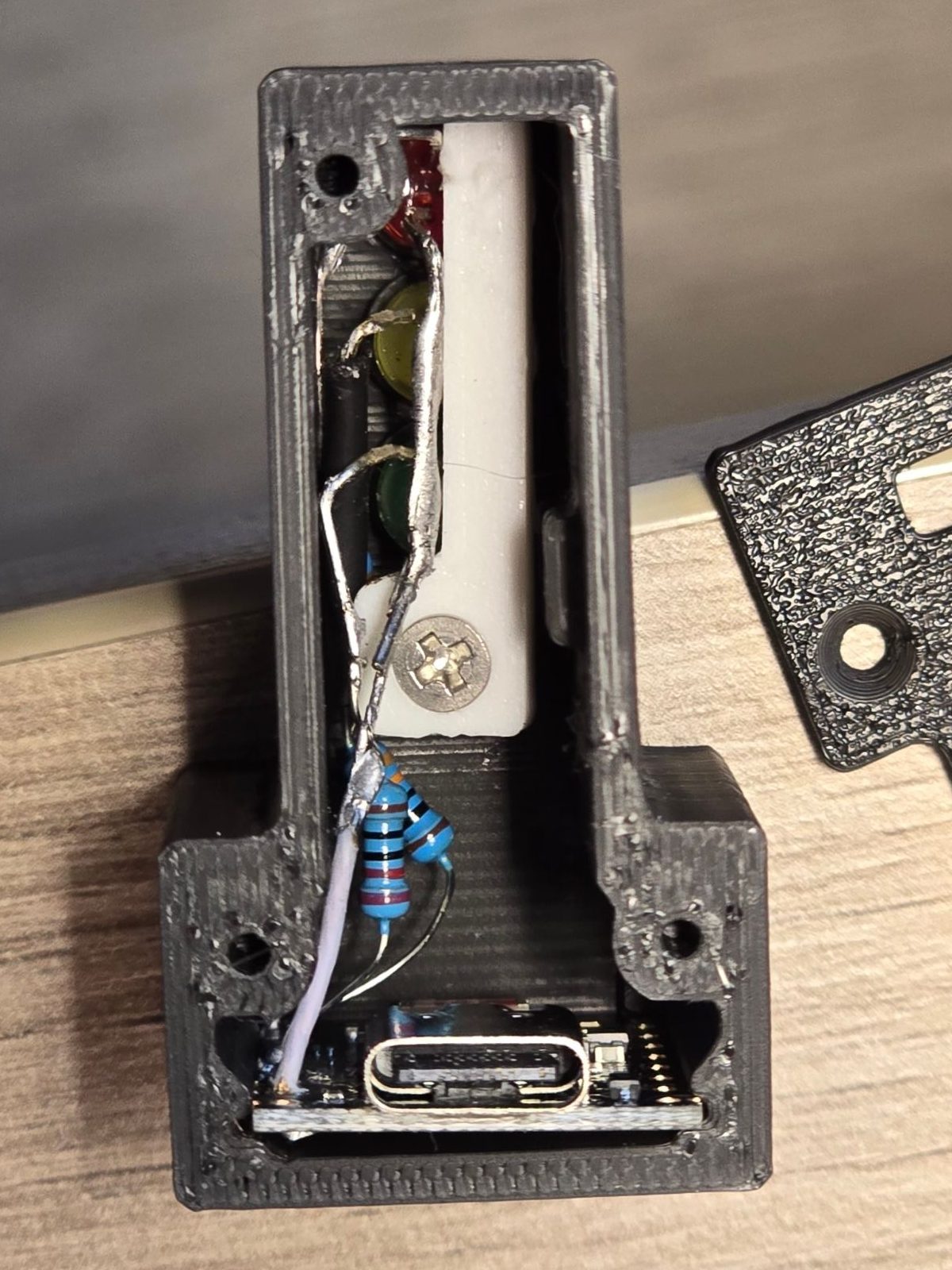
-
Test the LEDs before closing the cover. The board needs BroGlow firmware; see Check the wiring before connecting BroGlow. Leave BOOT and RESET reachable and enough wire slack to slide the board out. Then close the rear with three screws, tightened by hand; the cover must close without bending the board or pinching wires.
- Glue two magnets into the tower pockets with their faces flush with the mating surface; do not push them to the bottom of the pocket. Let the glue set. Snap the other two magnets onto the tower magnets: they attach with the right polarity by themselves. Put glue into the mascot pockets and press the mascot onto the protruding magnets until the halves meet, so the magnets seat flush. Keep glue off the magnet faces and wipe any squeeze-out. Separate the halves only after the glue cures.
- Glue both eyes into the front pockets. Bring the hand to the tower sideways; the magnet faces should touch, and all mascot feet and the tower base should sit flat on the table. Detach the mascot with a gentle sideways pull when it is in the way.
For servicing, remove the cover and withdraw the board rearward without pulling wires. To remove the LED retainer, undo its screw, slide down 1.3 mm, then pull back.
Generate from source
Install uv. Run from the root of the full repository or GitHub's source ZIP.
uv run --frozen --only-group cad python scripts/package-enclosure.py
Output: dist/enclosure/broglow-models-vVERSION.zip and its .sha256.